Teleprompter app for your hardware teleprompter
Any rig that reflects a phone or tablet in glass works with ScrollCue. Turn on Mirror, slide the device in and read. Free, with no brand app needed.
Open the app · FreeSee pricing
- Mirror mode free
- Any phone or tablet
- No brand app needed
Quick answer
Any hardware teleprompter that reflects a phone or tablet in glass works with ScrollCue, including Neewer, Desview, Glide Gear, GVM, Leeventi and the Elgato Prompter. Open ScrollCue on the device, turn on Mirror so the reflection reads correctly, slide it into the rig and read. No brand app is needed.
- Works with
- Any mirror-screen rig
- Key setting
- Mirror on
- Elgato Prompter
- Display mode, as a monitor
- Cost
- Free
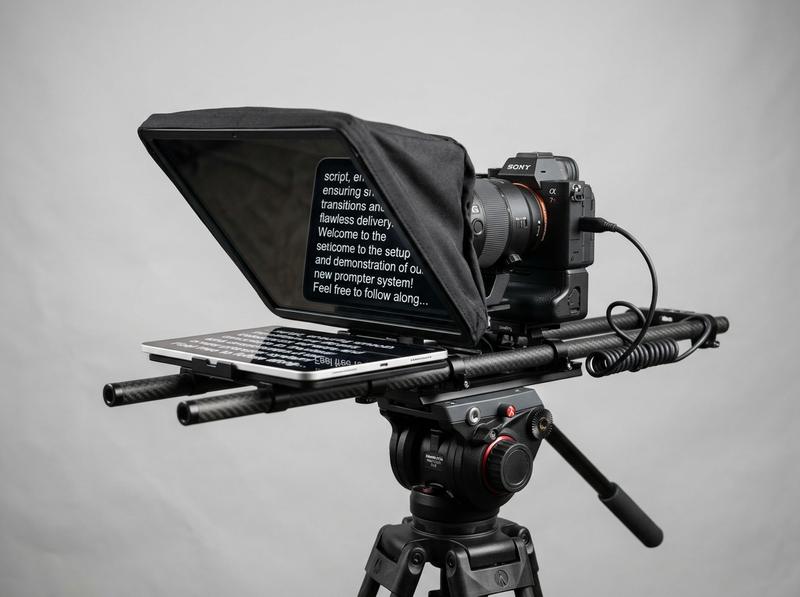
Mirror mode
Text that reads the right way round in the glass.
Every beam-splitter rig reflects the screen of the device inside it. Turn on Mirror, slide your phone or tablet in, and read. It works with Neewer, Desview, Glide Gear, GVM, Leeventi and Elgato Prompter, with no brand app needed.
Find your rigWorks with your rig
Every beam-splitter teleprompter shows the screen of the device inside it. If your rig holds a phone or tablet, or acts as a monitor for a computer, ScrollCue runs on it.
| Brand | Model | Holds | Works | Setup |
|---|---|---|---|---|
| Neewer | X12 | iPad and phones, bracket 25 × 22 cm | Yes | 2 min |
| Neewer | X14 | Tablets and phones, 70/30 glass70/30 glass. Beam-splitter glass that passes about 70% of light to the camera and reflects about 30% toward the presenter. It gives a single sharp reflection and costs roughly half a stop of exposure. | Yes | 2 min |
| Neewer | X11 | Check your manual | Yes | 2 min |
| Desview | T3 | Phones and tablets under 11 inches | Yes | 2 min |
| Desview | T5 | Check your manual | Yes | 2 min |
| Glide Gear | TMP-100 | iPad and phones, 12-inch class | Yes | 2 min |
| GVM | 12-inch | Tablets and phones | Yes | 2 min |
| Leeventi | Teleprompter | Phones and tablets | Yes | 2 min |
| Elgato | Prompter | Built-in screen, acts as a monitor | Yes | 5 min |
Our take, worked out
One rule, one number worked out for this setup, and what we would not spend money or time on.
The rule
Pick glass by the room, not the spec sheet
Beam-splitter glassBeam-splitter glass. Partly mirrored glass mounted at 45° in front of a camera. The camera sees through it while the presenter sees the screen's reflection, so text sits directly over the lens. trades camera light for script brightness. In a bright room you need more reflection; in a dim studio you need more light through to the lens.
Worked out
½ stop
70/30 glass passes about 70% of the light, roughly half a stop of exposure (log₂ of 1 ÷ 0.7). 60/40 costs about 0.74 of a stop and 50/50 a full stop. The script you see is the reflected share: a 500-nit tablet reads like a 150-nit screen behind 70/30 glass.
What we would skip
- 50/50 glass in a dim room. You lose a full stop for brightness you do not need.
- A dedicated prompter monitor if you already own a tablet. Most rigs are built around one.
- Lenses wider than 24 mm full frame without checking the corners. The hood can creep into the frame.
Set up any rig in three steps
Open and paste
Open scrollcue.com/app on the device that goes in the rig and paste your script.
Mirror and size
Turn on Mirror, set large text and a narrow column, and set brightness to maximum.
Mount and read
Slide the device under the glass, frame your shot through the glass and press play.
4 topics
Neewer teleprompters
Neewer rigs ship with their own app, but any app that mirrors text works. ScrollCue adds sections, presenter notes, voice follow and a phone remote.
01Neewer X12 teleprompter app02Neewer X14 teleprompter app03Neewer X11 teleprompter app04Neewer setup checklistRead the full guideShow less
Neewer X12 teleprompter app #
Holds iPad and phones in a 25 × 22 cm bracket, 14-inch glass.
Works with the Neewer X12? Yes. The X12 takes an iPad or a phone in a bracket listed at 25 × 22 cm, under a 14-inch beam-splitter glass with 75% light transmission. Neewer recommends a 45° glass angle and lenses longer than 28 mm; wider lenses can show the hood in frame.
Tips for the Neewer X12
- The included RT-110 remote is built for Neewer's own app. With ScrollCue, use a phone as the remote (Pro) or voice followVoice follow. A prompter mode that listens to you and scrolls to match your speech, holding its place when you pause or paraphrase. In ScrollCue it runs on your device and is part of Pro..
- At 14 inches of glass, an iPad in landscape gives the largest readable text from a typical 1 to 2 m camera distance.
Setup is the same three steps as any rig: open ScrollCue on the device, turn on Mirror, slide it under the glass. Also see: Neewer X14 · Desview T3
Neewer X14 teleprompter app #
Folding rig with 70/30 beam-splitter glass.
Works with the Neewer X14? Yes. The X14 is a folding rig with 70/30 beam-splitter glass: 70% of light passes to the lens and 30% reflects the screen toward you. The X14 II is the all-in-one version with Neewer's RT113 remote and app control.
Tips for the Neewer X14
- 70/30 glass reflects less light than a mirror, so set the screen to full brightness and use white or yellow text on black.
- Check whether your X14 II holds a tablet or uses its own display, and size the text to that screen.
Setup is the same three steps as any rig: open ScrollCue on the device, turn on Mirror, slide it under the glass. Also see: Neewer X12 · Neewer X11
Neewer X11 teleprompter app #
Compact Neewer rig for phones and small tablets.
Works with the Neewer X11? Yes. The X11 reflects the screen of the phone or tablet you put in it, so ScrollCue works the same way as on the larger Neewer rigs. Check the manual for the largest device the bracket takes.
Tips for the Neewer X11
- On a phone-sized screen, keep lines to about five words with the narrow column so you can read without moving your eyes sideways.
- Use the cue lineCue line. A fixed marker near the top of the prompter that shows which line to read. Keeping it close to the lens keeps your eyes close to the camera. near the top so the line you read sits closest to the lens.
Setup is the same three steps as any rig: open ScrollCue on the device, turn on Mirror, slide it under the glass. Also see: Neewer X12 · Desview T3
Neewer setup checklist #
Glass angle, lens, light and remote.
- Glass at 45°. A tilted glass shows a skewed, doubled reflection.
- Lens longer than 28 mm on the X12, so the hood stays out of frame. Push the lens close to the hood to stop reflections.
- Darken the room behind you or put a black cloth behind the glass if the reflection looks faint.
- Clean both sides of the glass with the included cloth. Smudges show up in a 4K frame.
- Remote: Neewer's remotes pair with Neewer's app. With ScrollCue, a phone remote (Pro) runs play, speed and sections.
2 topics
Desview teleprompters
Desview's compact rigs slide over the lens with adapter rings, so the reflected script sits right in front of the camera.
01Desview T3 teleprompter app02Desview T5 teleprompter appRead the full guideShow less
Desview T3 teleprompter app #
Phones and tablets under 11 inches, 194 × 140 mm mirror.
Works with the Desview T3? Yes. The T3 takes phones and tablets under 11 inches behind a mirror of about 194 × 140 mm. It mounts to the lens with adapter rings from 49 to 82 mm and comes with a remote.
Tips for the Desview T3
- A small mirror means short lines: use the narrow column and large text.
- The included remote is built for Desview's app; use voice follow or a phone remote with ScrollCue Pro.
Setup is the same three steps as any rig: open ScrollCue on the device, turn on Mirror, slide it under the glass. Also see: Desview T5 · Neewer X12
Desview T5 teleprompter app #
Larger Desview rig for tablets.
Works with the Desview T5? Yes. The T5 reflects the tablet or phone you mount in it, so ScrollCue's mirror modeMirror mode. A setting that flips the text horizontally so it reads the right way round after reflecting off teleprompter glass. works exactly as on the T3. Check the manual for the largest tablet it takes.
Tips for the Desview T5
- A larger glass lets you sit farther from the camera with bigger text, which also reduces visible eye movement.
- If your T5 mounts on the lens with adapter rings like the T3, check your lens filter thread before the shoot and pack the matching ring.
Setup is the same three steps as any rig: open ScrollCue on the device, turn on Mirror, slide it under the glass. Also see: Desview T3 · Glide Gear TMP-100
5 topics
Glide Gear, GVM, Leeventi and Elgato
Same idea, different rigs: mirror the text, size it for the glass, and frame through it.
01Glide Gear TMP-100 teleprompter app02GVM 12-inch teleprompter app03Leeventi teleprompter app04Does ScrollCue work with the Elgato Prompter?05Does ScrollCue work with any teleprompter rig?Read the full guideShow less
Glide Gear TMP-100 teleprompter app #
12-inch class rig for iPad and phones.
Works with the Glide Gear TMP-100? Yes. The TMP-100 is a 12-inch class rig listed as iPad and smartphone compatible. ScrollCue runs on the iPad or phone under the glass.
Tips for the Glide Gear TMP-100
- An iPad in landscape fills most of a 12-inch glass; on a phone, turn the text size up and use the narrow column.
- Set the rig on a tripod head rated for the camera, tablet and glass together; a 12-inch rig with an iPad is front-heavy.
Setup is the same three steps as any rig: open ScrollCue on the device, turn on Mirror, slide it under the glass. Also see: GVM 12-inch · Neewer X12
GVM 12-inch teleprompter app #
Tablet and phone rig.
Works with the GVM 12-inch teleprompter? Yes. GVM's 12-inch rig reflects a tablet or phone, so ScrollCue works with mirror mode on.
Tips for the GVM 12-inch teleprompter
- Check the bracket width against your tablet before mounting, and lock screen rotation so the script does not flip mid-read.
- A 12-inch glass suits a 10 to 11-inch tablet in landscape; with a phone, most of the glass stays empty, so raise the text size to fill it.
Setup is the same three steps as any rig: open ScrollCue on the device, turn on Mirror, slide it under the glass. Also see: Glide Gear TMP-100 · Leeventi
Leeventi teleprompter app #
Portable rigs for phones and tablets.
Works with the Leeventi teleprompter? Yes. Leeventi's portable rigs reflect the phone or tablet you place in them. ScrollCue runs with mirror mode on.
Tips for the Leeventi teleprompter
- Portable rigs often sit close to the face; lower the scroll speedScroll speed. How fast the script moves. ScrollCue measures it in pixels per second (10 to 240 px/s). Conversational delivery is usually around 130 to 160 words per minute; sermons are often slower. slightly and use the cue line near the top.
- Fold-flat frames can flex. Tighten every knob after mounting the camera and check the glass is still at 45°.
Setup is the same three steps as any rig: open ScrollCue on the device, turn on Mirror, slide it under the glass. Also see: GVM 12-inch · Desview T3
Does ScrollCue work with the Elgato Prompter? #
Yes. Set the Prompter to Display mode in Camera Hub and run ScrollCue full screen on it.
Works with the Elgato Prompter? Yes. The Prompter has its own screen. In Camera Hub 1.8 or later, open the Prompter tab, choose Display under Content, and the Prompter becomes an extra monitor for your computer.
Set up the Elgato Prompter with ScrollCue
- In Camera Hub, set the Prompter's content to Display.
- Open scrollcue.com/app in a browser window and drag it onto the Prompter's screen.
- Make the window full screen on that display. Check the reflection, and turn on Mirror in ScrollCue only if the text reads backwards.
Good to know
- Keep the browser window on the Prompter and your call or OBS on the main monitor.
- If your camera stops showing up in Camera Hub, see the Camera Hub fix guide.
- Want your stream chat on the Prompter too? Camera Hub's Chat mode shows Twitch chat on its own. In Display mode, ScrollCue's window beside script (Pro) shows any platform's chat next to your script, so you read both in front of the lens. See chat beside the script.
Source: Elgato Prompter Display Mode.
Does ScrollCue work with any teleprompter rig? #
Yes. Any rig that reflects a phone or tablet in glass works. Turn on Mirror and slide the device in.
If a rig reflects a screen in glass, ScrollCue works with it: Parrot, BigView, studio hoods with an overhead monitor, or a picture-frame build on your desk. Turn on Mirror for rigs where the screen faces up under the glass.
Building your own? The DIY glass guide covers glass size, materials and a build you can finish in an afternoon.
5 topics
How to choose a hardware teleprompter
Glass size, glass type, lens and screen decide whether a rig works for your shoot. Check these before you buy.
01Glass size and reading distance02What glass do teleprompters use?03Lens and camera fit04Phone, tablet or built-in screen05Do I need a teleprompter remote?Read the full guideShow less
Glass size and reading distance #
Bigger glass, bigger text, farther away.
The glass limits how big the text can be, and text size limits how far back you can sit. Phone-sized rigs suit close talking-head shots. 12 to 14-inch glass with a tablet suits sitting a metre or two from the camera. Farther away, your eye movement also looks smaller on camera.
What glass do teleprompters use? #
Most use 70/30 beam-splitter glass, which passes about 70% of the light to the camera and reflects the rest to you.
Beam-splitter glass lets most of the light through to the lens and reflects the rest toward you. On 70/30 glass, 70% reaches the camera and 30% of the screen's light reaches your eyes, so screen brightness matters. Cheap rigs sometimes use plain glass or acrylic, which can show double images; real beam-splitter glass gives a single sharp reflection.
Lens and camera fit #
Focal length and adapter rings.
The hood must sit close to the lens without appearing in frame. Rigs list a minimum focal length; the Neewer X12, for example, asks for lenses longer than 28 mm. Lens-mounted rigs such as the Desview T3 use adapter rings, so check your lens's filter thread. Wide lenses can see the hood's edges.
Phone, tablet or built-in screen #
What sits under the glass.
- Phone: light and portable, small text. Good for solo creators on location.
- Tablet: the standard for most rigs. Big text, long battery life, and ScrollCue runs on any iPad or Android tablet.
- Built-in screen: rigs like the Elgato Prompter act as a computer monitor, so the script runs on your computer and the rig just displays it.
Do I need a teleprompter remote? #
No. Set a fixed speed or use voice follow, both free to start, or use a phone as the remote on Pro.
Rigs often ship with a Bluetooth remote paired to the maker's app. With ScrollCue you have three options: voice follow, a phone as a remote (both Pro), or a fixed scroll speed you set before you start. The phone remote pairs by QR code and talks to the prompter over the same Wi-Fi, so it works in venues with no internet.
4 topics
Running a rig on the day
Remote control, reflections and balance decide whether a rig is a pleasure or a fight.
01Remotes and who controls the script02Why do I see a double image in teleprompter glass?03Balance, tripods and weight04Tablet settings checklistRead the full guideShow less
Remotes and who controls the script #
Voice, a phone remote, or a set speed.
Rig remotes are usually paired to the maker's own app, so they do not drive other apps. With ScrollCue you choose one of three ways to control the script:
- Set speed: free. Pick a speed before you start and pause by touching the screen if the device is in reach.
- Phone remote (Pro): pair a phone by QR code for play, pause, speed and section jumps from your hand or from someone off camera.
- Voice follow: the script moves only while you speak, so nobody needs to touch anything during the take.
Why do I see a double image in teleprompter glass? #
Both surfaces of the glass reflect. Real beam-splitter glass, a hood and less room light fix most ghosting.
- Room in the glass: light from behind the camera reflects off the glass into the lens. Close the hood around the lens and turn off lights behind the rig.
- Double text: plain glass reflects from both surfaces. Beam-splitter glass mostly fixes it; check the glass sits at exactly 45°.
- Hot spot on your face: a bright white script lights you up. Use white or yellow text on black and lower your key light slightly instead.
- Text too faint: 70/30 glass returns only about 30% of the screen's light. Screen brightness to maximum, room light down.
Balance, tripods and weight #
A rig plus a tablet is front-heavy.
A tablet and glass hanging in front of the lens moves the centre of gravity forward. Slide the camera back on its plate, use a tripod head rated well above the total weight, and tighten every knob before you let go. On a light tripod, hang a bag from the centre column to steady it.
Lens-mounted rigs such as the Desview T3 put the weight on the lens itself, so support long or heavy lenses with a lens collar or rail.
Tablet settings checklist #
Set these before the device goes in the rig.
- Brightness to maximum and auto-brightness off.
- Rotation locked in the orientation the rig needs.
- Do Not Disturb on, so no notification covers the script.
- Battery charged or plugged in; ScrollCue keeps the screen awake, which uses power.
- ScrollCue added to the home screen, so it opens full screen with no address bar.
9 questions
Questions, answered
Short answers to what people ask before they press play.
01Why does my teleprompter text read backwards?02Do I need the brand's own app?03Will the remote that came with my rig work?04How bright should the screen be?05What text size should I use?06Which browser should I use on the rig device?Read all answers · 3 more answersShow less
Why does my teleprompter text read backwards? #
Beam-splitter glass reflects the screen like a mirror. Turn on Mirror in ScrollCue and the text flips so it reads correctly in the glass.
Do I need the brand's own app? #
No. Any app that mirrors text works in any glass rig. ScrollCue is free in the browser and adds sections, presenter notes and, on Pro, a phone remote.
Will the remote that came with my rig work? #
Brand remotes are built for the brand's app. With ScrollCue, use a phone as the remote or voice follow, both on Pro, or keep a hand on the device.
How bright should the screen be? #
Maximum. Beam-splitter glass reflects only part of the light, about 30% on 70/30 glass, so a bright screen and white or yellow text on black read best.
What text size should I use? #
Large enough to read from your camera distance without squinting. Start with the largest size, then shrink it until each line holds about five to eight words.
Which browser should I use on the rig device? #
Safari on iPhone and iPad, Chrome on Android. Both support every ScrollCue feature.
Does the glass show up in my video? #
Not if the lens sits close to the hood and the room behind you is darker than the screen. Clean the glass and avoid wide lenses that see the hood edges.
Can I use any tablet in my teleprompter? #
Any tablet that fits the rig's bracket and runs a current browser. Check the bracket size in your rig's manual against your tablet's dimensions.
Should I use a phone or a tablet in my rig? #
A tablet gives bigger text and lets you sit farther from the camera. A phone suits compact rigs and close talking-head shots.